
Server-Sent Events in ASP.NET Core: Real-Time Updates Without WebSockets
Real-time features have become a standard requirement in modern web apps.

Most developers immediately reach for WebSockets or SignalR, but in many cases that is unnecessary.
There is a much simpler solution built directly into the browser:
Server-Sent Events (SSE).
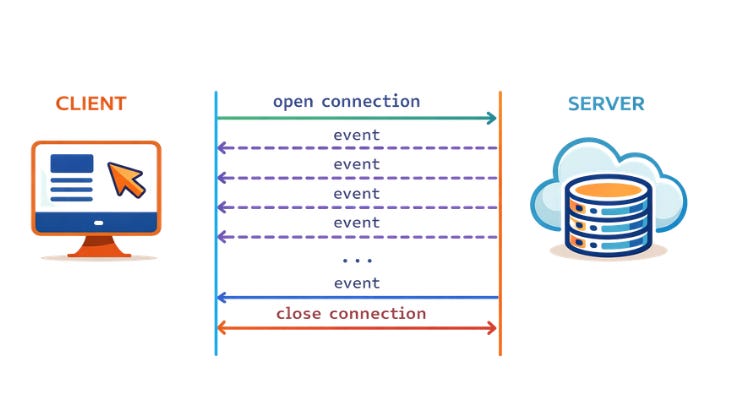
SSE allows the server to push updates to the browser over a simple HTTP connection.
And starting with modern ASP.NET Core, SSE support is now first-class with Results.ServerSentEvents().
Let’s explore how it works.
What Are Server-Sent Events?
Server-Sent Events are a one-way streaming protocol where:
The client opens a connection
The server keeps the HTTP connection open
The server continuously pushes messages
The browser receives these messages using the EventSource API.
Key characteristics:
Built on standard HTTP
Automatic reconnection
Supports custom events
Lightweight compared to WebSockets
Architecture:
Browser (EventSource)
        │
        │ HTTP GET /progress
        ▼
ASP.NET Core SSE endpoint
        │
        │ Stream events
        ▼
Browser receives messages in real time
Basic SSE Example in ASP.NET Core
Let’s build a simple job progress stream.
Server Setup
using System.Net.ServerSentEvents;

var builder = WebApplication.CreateBuilder(args);
var app = builder.Build();

app.MapGet("/progress", () =>
{
    async IAsyncEnumerable<SseItem<string>> Stream()
    {
        for (int i = 1; i <= 10; i++)
        {
            yield return new SseItem<string>(
                data: $"{i} completed"
            );

            await Task.Delay(1000);
        }

        yield return new SseItem<string>(
            data: "Job Finished ✅",
            eventType: “completed”
        );
    }

    return Results.ServerSentEvents(Stream());
});

app.Run();
Key idea:
Instead of returning a normal response, we return an async stream of events.
ASP.NET Core automatically converts each item into the SSE wire format:
data: Step 1 completed

data: Step 2 completed

event: completed
data: Job Finished
Client Side: Listening to Events
Browsers support SSE through the EventSource API.
Example:
<script>
const evt = new EventSource("/progress");

// default messages
evt.onmessage = function(e) {
    console.log(e.data);
};

// custom event
evt.addEventListener("completed", function (e) {
    console.log("Job done:", e.data);
    evt.close();
});
</script>
When the server sends:
data: Step 3 completedThe browser triggers:
evt.onmessageWhen the server sends:
event: completed
data: Job Finished
The browser triggers the custom event listener.
Full Working Example
Your HTML page could look like this:
<h2>Live Job Progress</h2>
<div id="log"></div>

<script>
const evt = new EventSource("/progress");

evt.onmessage = function(e) {
    document.getElementById("log").innerHTML +=
        "<p>" + e.data + "</p>";
};

evt.addEventListener("completed", function (e) {
    document.getElementById("log").innerHTML +=
        "<p><strong>" + e.data + "</strong></p>";

    evt.close();
});
</script>
The result is a live updating progress log without refreshing the page.
Why Use SSE Instead of WebSockets?
SSE shines when you only need server → client streaming.
Use SSE when you need:
progress updates
streaming logs
AI token streaming
notifications
dashboard updates
Use WebSockets when you need two-way communication.
Advantages of SSE in ASP.NET Core
Modern ASP.NET Core makes SSE especially powerful because it integrates with:
IAsyncEnumerableMinimal APIs
Streaming responses
This means you can connect SSE directly to:
database change streams
background workers
message queues
AI token streams
Example pattern:
Queue → Background Worker → SSE Stream → BrowserProduction Tips
1. Disable response buffering
Some proxies buffer responses.
For Nginx:
proxy_buffering off;2. Use keep-alive messages
If the connection stays silent too long, some proxies close it.
Send periodic heartbeat events.
3. Handle reconnects
Browsers automatically reconnect if the connection drops.
You can support Last-Event-ID for reliable resume.
When SSE Is Perfect
SSE is ideal for:
AI streaming responses
Live job progress
Dev logs
Real-time dashboards
Notifications
And because it runs over plain HTTP, it works beautifully behind load balancers and CDNs.
Final Thoughts
Server-Sent Events are one of the most underrated features in modern web development.
With ASP.NET Core’s new Results.ServerSentEvents() API, building real-time experiences is now incredibly simple.
In many cases, you can replace complex WebSocket infrastructure with just:
IAsyncEnumerable + ServerSentEventsSometimes the best real-time solution is also the simplest one.
👉 Full working code available at:
🔗https://sourcecode.kanaiyakatarmal.com/ServerSentEvents
I hope you found this guide helpful and informative.
Thanks for reading!
If you enjoyed this article, feel free to share it and follow me for more practical, developer-friendly content like this.