
API Versioning in ASP.NET Core: The Complete Guide to Versioning .NET APIs
A practical guide to URL, query-string, header, and media-type versioning, backward compatibility, deprecation, and production-ready API evolution in .NET.

Your API works perfectly today.
Then someone asks:
“Can we change the response format?”
That’s where things get interesting.
An API isn’t just code. It’s a contract.
Once mobile apps, frontend applications, partners, or other services depend on that contract, changing it can break production.
That’s why API versioning matters
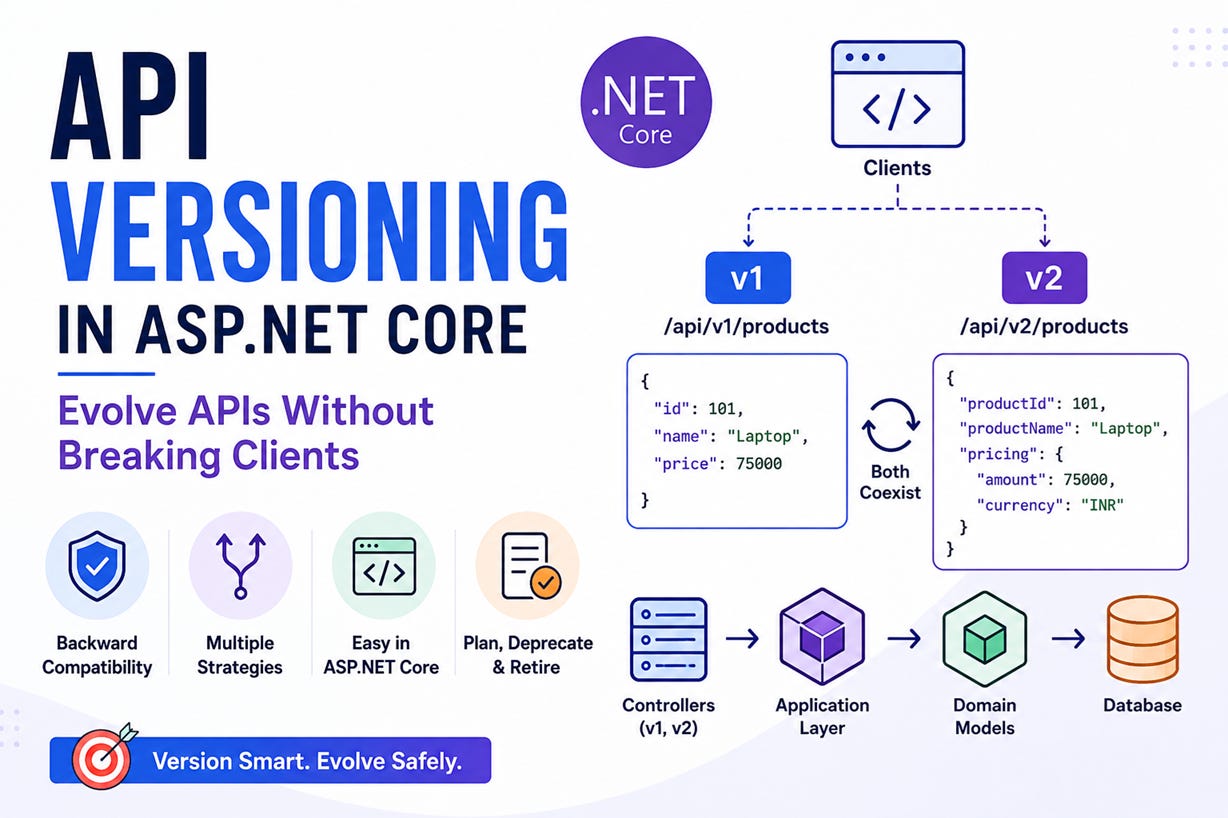
Why Do We Need API Versioning?
Imagine your API currently returns:
{
  "id": 101,
  "name": "Laptop",
  "price": 75000
}
Your client uses:
product.priceNow you redesign the response:
{
  "productId": 101,
  "productName": "Laptop",
  "pricing": {
    "amount": 75000,
    "currency": "INR"
  }
}
Looks better.
But the old client is now broken.
Instead of forcing every client to upgrade immediately, we can support both:
/api/v1/products
/api/v2/products
Existing clients stay on v1.
New clients use v2.
That’s the real purpose of API versioning.
When Should You Create a New Version?
Not every change requires a new API version.
Adding an optional response property is usually safe:
{
  "id": 101,
  "name": "Laptop",
  "price": 75000,
  "category": "Electronics"
}
But these are common breaking changes:
Removing a property
Renaming a property
Changing a property’s type
Changing the meaning of a property
Making a previously optional request field required
Changing the structure of a response
For example:
name → productNameis a breaking change.
So is:
price: numberbecoming:
price: objectThese are good candidates for a new API version.
4 Common API Versioning Strategies
There are four popular approaches.
1. URL Versioning
GET /api/v1/products
GET /api/v2/products
Simple, visible, and easy to debug.
2. Query String
GET /api/products?api-version=1.0The URL stays the same, but the version is specified as a parameter.
3. Header
GET /api/products
X-API-Version: 2.0
The URL remains clean, but the version is less obvious when debugging.
4. Media Type
Accept: application/vnd.company.products-v2+jsonPowerful, but more complicated.
Which One Should You Use?
For most enterprise ASP.NET Core APIs, I’d choose:
/api/v1/...
/api/v2/...
Why?
Because API versioning isn’t only about architecture.
It’s also about operations.
When you’re looking at:
Logs
Traces
Metrics
Alerts
Swagger
Support tickets
it’s immediately obvious which version is being used.
Simple APIs are often easier to operate.
API Versioning in ASP.NET Core
The modern .NET API versioning ecosystem uses the Asp.Versioning packages.
A typical configuration starts like this:
builder.Services.AddApiVersioning(options =>
{
    options.DefaultApiVersion = new ApiVersion(1, 0);
    options.AssumeDefaultVersionWhenUnspecified = true;
    options.ReportApiVersions = true;
});
Then version your controller:
[ApiController]
[ApiVersion(1.0)]
[Route("api/v{version:apiVersion}/products")]
public class ProductsController : ControllerBase
{
    [HttpGet]
    public IActionResult Get()
    {
        return Ok(new
        {
            Id = 1,
            Name = "Laptop",
            Price = 75000
        });
    }
}
Now you can call:
GET /api/v1/productsFor v2, create a different contract:
[ApiController]
[ApiVersion(2.0)]
[Route("api/v{version:apiVersion}/products")]
public class ProductsV2Controller : ControllerBase
{
    [HttpGet]
    public IActionResult Get()
    {
        return Ok(new
        {
            ProductId = 1,
            ProductName = "Laptop",
            Pricing = new
            {
                Amount = 75000,
                Currency = "INR"
            }
        });
    }
}
Now both can coexist:
GET /api/v1/products
GET /api/v2/products
Don’t Duplicate Business Logic
This is where API versioning can go wrong.
Avoid:
V1 Controller
    ↓
V1 Business Logic

V2 Controller
    ↓
V2 Business Logic
Now every bug fix needs to happen twice.
Instead:
             ┌── V1 Controller
             │
Clients ─────┤
             │
             └── V2 Controller
                     ↓
               Application
                     ↓
                  Domain
                     ↓
                 Database
The controllers can have different DTOs while sharing the same application and domain logic.
Version the Contract, Not the Domain
Your domain model shouldn’t care whether the request came from v1 or v2.
For example:
public class Product
{
    public int Id { get; set; }

    public string Name { get; set; } = default!;

    public decimal Price { get; set; }
}
Your API contracts can be different:
public record ProductV1Response(
    int Id,
    string Name,
    decimal Price);
and:
public record ProductV2Response(
    int ProductId,
    string ProductName,
    decimal Amount,
    string Currency);
Think of the architecture as:
Domain Model
     ↓
 ┌───┴───┐
 ↓       ↓
V1 DTO  V2 DTO
This keeps version-specific concerns at the API boundary.
What About EF Core?
API versioning doesn’t mean you need a different database for every API version.
You can have:
API v1 ─┐
        ├── Application ── EF Core ── Database
API v2 ─┘
Both APIs can retrieve the same entity and map it into different response models.
That’s an important separation:
API version ≠ database version.
Don’t Keep Old Versions Forever
Supporting old versions forever creates technical debt.
You might eventually end up with:
v1
v2
v3
v4
v5
Every version increases:
Testing
Documentation
Monitoring
Security
Maintenance
Support costs
Instead, give versions a lifecycle:
v1 Released
    ↓
v2 Released
    ↓
v1 Deprecated
    ↓
Migration Period
    ↓
v1 Retired
When you release v2, don’t necessarily kill v1 immediately.
Give consumers time to migrate.
API Versioning for Mobile Apps
Mobile applications make versioning especially important.
You might have:
Old App     → API v1
Current App → API v2
New App     → API v2
Users don’t upgrade their apps simultaneously.
If your backend suddenly removes something required by an older mobile app, you can break thousands of devices.
API versioning gives you a compatibility window.
Common Mistakes
- Creating a new version for every change
Ask first:
Is this change actually breaking?
- Sharing DTOs between versions
Separate contracts make breaking changes easier to control.
- Putting version checks everywhere
Avoid:
if (version == 1)
{
}
else
{
}
throughout your business logic.
Keep version-specific behavior near the API boundary.
- Forgetting documentation
Every version should clearly document:
What’s changed
What’s deprecated
What clients should migrate to
- Never retiring versions
Versioning without a retirement strategy eventually becomes technical debt.
My Recommended Approach
For most production ASP.NET Core APIs:
/api/v1/...
/api/v2/...
Use:
Separate API contracts
Contracts
├── V1
└── V2
Keep:
Shared business logic
V1 ─┐
    ├── Application → Domain
V2 ─┘
And define:
A clear deprecation policy
Release → Deprecate → Migrate → RetireFinal Thought
API versioning isn’t about putting /v1 in a URL.
It’s about managing change.
Your backend will evolve.
Your clients won’t all evolve at the same speed.
Good API versioning creates a compatibility boundary between:
Today's clients
       ↓
   API Contract
       ↓
Tomorrow's backend
The goal isn’t to avoid change.
The goal is to make change safe.
An API isn’t just code. It’s a contract.
👉 Full working code available at:
🔗 https://sourcecode.kanaiyakatarmal.com/APIVersioningNETCore
I hope you found this guide helpful and informative.
Thanks for reading!
If you enjoyed this article, feel free to share it and follow me for more practical, developer-friendly content like this.